





Changing the Image Quality (EOS M3)
Solution
You can select the resolution (size) and quality (compression ratio) of your recorded images from a combination of 8 types.
REFERENCE
- [
 ] and [
  ] indicate the different levels of image quality caused by different compression rates. If using the same resolution, [ ] will produce better image quality. [ ] will result in slightly lower image quality, but will enable you to record more images. [
  ] and [
  ] feature [ ] image quality.
 - Not available in [
 ] mode.
The procedure for changing the image quality is explained below.
1. Press the power button to turn the camera on.

2. Press the [  ] button.
] button.
3. Press the [ ] button.
] button.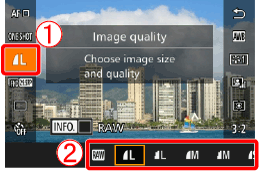

 Press the [
  ], [
], [  ] buttons to choose [Resolution] in the menu.
 Press the [ ], [ ] buttons or turn the [
  ] or [
  ] dial to choose the desired option.
Press the [ ] button to configure the setting.
] button to configure the setting.