





"Standard" cannot be selected in the preset setting. (Mac OS X Lion (v10.7))
Solution
Phenomenon)
When trying to perform printing, the message "Make sure that [Standard] is selected for [Presets] and ..." is displayed, however, there is no [Standard] as an option of Presets.
< The message of the application software >
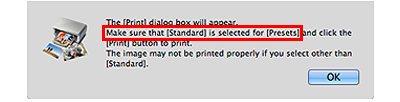

< Print dialog >
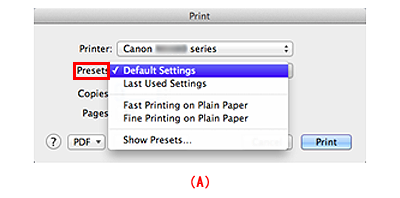
(A) No "Standard" as an option of Presets
The applicable application software)
Easy-PhotoPrint EX, Easy-PhotoPrint Pro, MP Navigator EX, MP Navigator EX
Solution)
In Presets of the Print dialog, select "Default Settings" to perform printing.
REFERENCE
The descriptions are different, but the same functions are equipped between [Default Settings] in Mac OS X Lion (v10.7) and [Standard] in Mac OS X v10.6 or before.