




A photo is not shot immediately after the shutter button is pressed (there is some delay before the photo is taken)
Solution
Is the camera set to self-timer shooting?
With self-timer shooting on, even if you press the shutter button, the photograph will not be shot immediately.
Turn self-timer shooting off using the procedure below.
IMPORTANT
The position and shape of the operation buttons may differ depending on the model you use.
1. Press the [ 

 ] button.
] button.
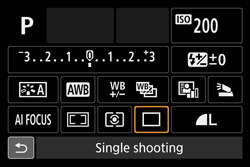
2. Select an item other than the self-timer using the [  ], [
], [  ] keys.
], [ ] keys.Single-image shooting ( ) has been selected in the example image below.
) has been selected in the example image below.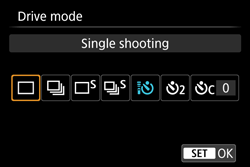
3. Press [  ].
].
].The camera is set to single-image shooting () and self-timer shooting is turned off.
) and self-timer shooting is turned off.