






Shooting Still Images during Movie Recording (EOS M3)
Solution
You can shoot still images during movie recording as follows.
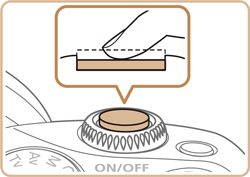
1. While shooting a movie, focus on a subject.
Press the shutter button halfway down to readjust the focus and exposure. (The camera will not beep.)
NOTE
- Movie recording will continue.
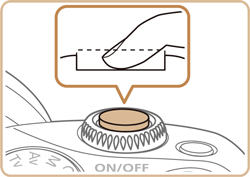
2. Press the shutter button all the way down.
Your shot will be recorded.
REFERENCE
- Shooting still images during movie recording may not be possible when the memory card’s recording speed is slow, or when there is not enough free internal memory.
- Shutter sounds will be heard in the movie.
- An orange AF frame is displayed with [
 ] if the camera cannot focus when you press the shutter button halfway. No picture is taken, even if you press the shutter button all the way down.
 - The flash is disabled.
- Movie recording may stop if shooting still images fills up the internal memory.
NOTE
- In the menu, set [AF w/ shutter button during ] in the
 -5] tab to [Disable] to turn off focusing when the shutter button is pushed halfway when shooting movies.
 - In [
 ], [
], [  ], [
], [  ], [
], [  ], and [
  ] (16:9 aspect ratio) modes, still photos will be saved in the [
  ] aspect ratio.
 - In [
 ] and [ ] (4:3 aspect ratio) modes, still photos will be saved in the [
  ] aspect ratio.