





Setting the flash to fire for each shot
Solution
When setting [Flash] to [Auto], [Flash] is not activated if the surroundings are light. However, when shooting with the subject backlit, [Flash] is sometimes used not to make the subject dark. This section describes the setting to shoot the shots with constant flash.
IMPORTANT
- The position and shape of the operation buttons, screens displayed, and setting items may differ according to the model you use.
- The procedure is shown on a PowerShot SX400 IS for the purposes of explanation.
- In some shooting modes, the [Flash] cannot be set to [On] to make it fire every time you shoot.
- The following example shows the procedure when the camera’s shooting mode has been set to [Program AE] (
 ).
).
For more information about shooting modes in which the flash cannot be set to on, please refer to the table at the end of the page.
1. Press the <Power> button to turn the camera on.
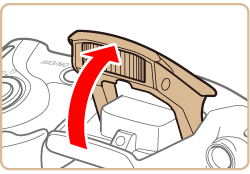
2. Lift the flash with your finger.
3. Press the <Flash> ( ) button.
) button.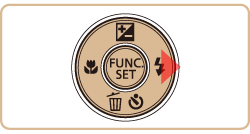
IMPORTANT
The setting screen cannot be accessed by pressing the <Flash> () button when the flash is lowered. Lift the flash with your finger in advance.
) button when the flash is lowered. Lift the flash with your finger in advance.4. Press the [  ], [
], [  ] buttons to choose [On] (
 ).
).
], [ ] buttons to choose [On] ().
5. If the following icon is displayed on the monitor, the setting process is complete.

The flash cannot be set to [On] in the modes indicated in the table below.
| Model | Shooting modes in which the flash cannot be set to [On] |
|---|---|
| PowerShot SX400 IS / PowerShot SX410 IS |  , , , , |
| PowerShot SX520 HS |  ,, ,, , , ,,, ,,, |