




Usable Paper
Solution
 Supported Paper Sizes
Paper sizes that can be loaded in the multi-purpose tray are listed below.
A4 (210.0 mm x 297.0 mm)
B5 (182.0 mm x 257.0 mm)
A5 (148.5 mm x 210.0 mm)
Legal (215.9 mm x 355.6 mm)
Letter (215.9 mm x 279.4 mm)
Executive (184.2 mm x 266.7 mm)
Oficio (216.0 mm x 317.0 mm)
Brazil Oficio (216.0 mm x 355.0 mm)
Mexico Oficio (216.0 mm x 341.0 mm)
Foolscap (216.0 mm x 330.0 mm)
16K (195.0 mm x 270.0 mm)
Envelope Monarch (98.4 mm x 190.5 mm)
Envelope No. 10 (COM10) (104.7 mm x 241.3 mm)
Envelope DL (110.0 mm x 220.0 mm)
Envelope C5 (162.0 mm x 229.0 mm)
Custom paper size (Width 76.2 to 216.0 mm x Length 188.0 to 356.0 mm)
Machine Settings for Paper TypesBefore printing, refer to the table below and make the appropriate paper settings in the printer driver, according to the type of paper that you have loaded.
| Paper Type | Printer Driver Paper Setting | |
| Plain paper *1 | 60 to 63 g/㎡ | [Plain L] |
| 64 to 89 g/㎡ | [Plain] | |
| Heavy paper | 90 to 163 g/㎡ | [Heavy] |
| [Heavy H] *2 | ||
| Transparency *3 *4 | [Transparency] | |
| Labels *4 | [Labels] | |
| Envelope | [Envelope] | |
*2 If toner is not fully fixed and printouts are faded when you select [Heavy], select this instead.
*3 Use laser printer transparencies.
*4 Use A4 or Letter size only.
IMPORTANT
Do not use the following types of paper:
- Wrinkled or creased paper
- Curled or rolled paper
- Torn paper
- Damp paper
- Very thin paper
- Paper printed by a thermal transfer printer
- Paper with a coarse texture
- Glossy paper
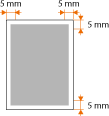
Printable RangeThe printable range is indicated in gray. Envelopes require a 10 mm margin on the top, bottom, left, and right.