





Changing the Recording programs according to the situation, such as in dark surroundings (XA25 / XA20)
Solution
You can make recordings of bright subjects in dark surroundings by changing the shutter speed or Special Scene recording program, or by using the optional VL-10Li / VL-10LiII video light.
Also, by using AGC Limit, you can make recordings in dark surroundings at a brightness close to how the scene actually looks.
This section explains how to change shooting modes.
1. Set the mode switch to <M> or <CINEMA>.

2. Set the power switch to CAMERA.

3. Touch [  ].
].
].
4. Touch [Rec. Programs].
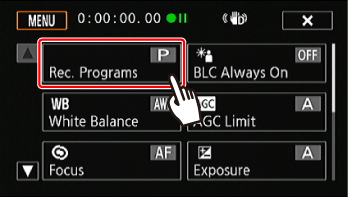
5. Touch [Tv Shutter-Pri. AE] and then set the desired shutter speed.

6. If you are recording in dark surroundings, set the shutter speed to 1/8, 1/15, or 1/30 seconds.
Touch [  ] or [
  ], or drag your finger along the dial.
] or [ ], or drag your finger along the dial.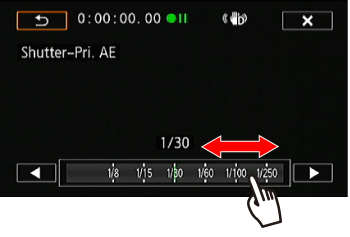
NOTE
When recording in dark surroundings, you can obtain a brighter picture by using slow shutter speeds; however, image quality may not be as good and autofocus may not work well.
Recording in a very bright ski resort or capturing the full colors of a sunset or a fireworks display becomes as easy as selecting a Special Scene recording program.
1. Set the mode switch to <M> or <CINEMA>.
2. Set the power switch to <CAMERA>.
3. Touch [ ].
].4. Touch [Rec. Programs].
5. Touch [SCN] (Special Scene recording program).
*The current Special Scene recording program setting is displayed.
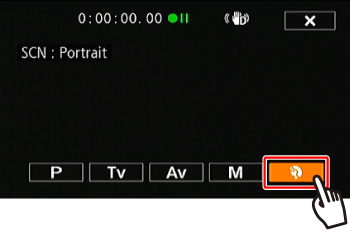
6. Drag your finger up or down to select the desired recording program.
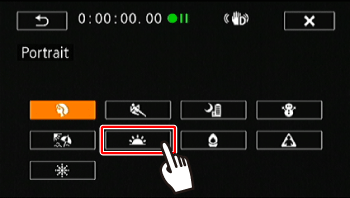
Options ( Default value)
Default value)| Special Scene Recording Program | Details |
 Portrait | The camcorder uses a large aperture, to achieve a sharp focus on the subject while blurring the background. |
 Sports | To record sports scenes such as tennis or golf. |
 Night Scene | To record nightscapes with lower noise. |
 Snow | To record in bright ski resorts without the subject being underexposed. |
 Beach | To record on a sunny beach without the subject being underexposed. |
 Sunset | To record sunsets in vibrant colors. |
 Low Light] | To record in low-light situations. |
 Spotlight | To record spotlit scenes. |
 Fireworks | To record fireworks. |
NOTE
- [Portrait]/[Sports]/[Snow]/[Beach]: The picture may not appear smooth during playback.
- [Portrait]: The blur effect of the background increases the more you zoom in <T>.
- [Snow]/[Beach]: The subject may become overexposed on cloudy days or in shaded places. Check the image on the screen.
- [Low Light]:
- Moving subjects may leave a trailing afterimage.
- Picture quality may not be as good as in other modes.
- White points may appear on the screen.
- Autofocus may not work as well as in other modes. In such case, adjust the focus manually.
- [Fireworks]: To avoid camcorder blur (blur due to the camcorder moving) we recommend using a tripod.