








How do I display shooting infomation during playback? (EOS 6D)
Solution
Press the < > (Playback) button.
> (Playback) button.The last captured image or last image viewed will appear.
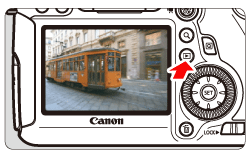
When pressing the <INFO.> button, you can switch to the infomation display.

 press the <INFO.> button.
The most detailed shooting information is shown below.
< Sample Image Taken in a Creative Zone Mode >
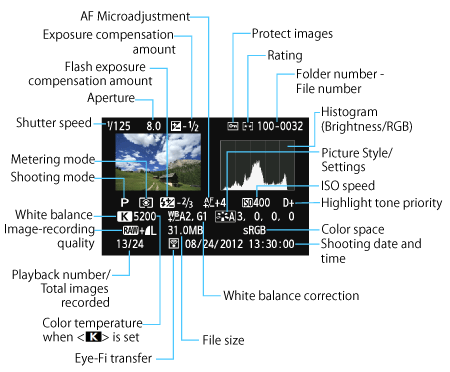
* When you shoot in RAW+JPEG image quality, the RAW image file size will be displayed.
* During flash photography without flash exposure compensation, [  ] will be displayed.
] will be displayed.* <HDR> and the dynamic range adjustment amount will be displayed for images taken in the HDR mode.
* [  ] will be displayed for multiple-exposure photos.
] will be displayed for multiple-exposure photos.* For still photos taken during movie shooting, [  ]will be displayed.
]will be displayed.* For JPEG images developed with the camera’s RAW processing function or resized, and then saved, [  ] will be displayed.
] will be displayed.