







Setting the Flash (Flash On) (PowerShot SX50 HS)
Solution
When setting [Flash] to [Auto], [Flash] is not activated if the surroundings are light. However, when shooting with the subject backlit, [Flash] is sometimes used not to make the subject dark. This section describes the setting to shoot the shots with constant flash.
IMPORTANT
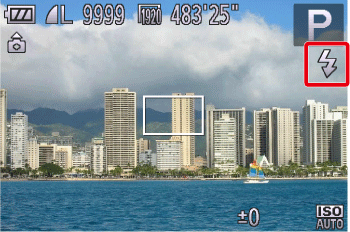
- The following explanations are provided based on the assumption that the [Shooting Mode] is set to [Program AE] (
 ).
). - In the following shooting modes, you cannot set the [Flash] to the On setting to make it fire every time you shoot.
- [AUTO] ( ) , [Sports] (
 ) , [High-speed Burst HQ] (
 ) , [Fireworks] (
 ) , [High Dynamic Range] (
 ) , [Movie] (
 ) , [iFrame Movie] (
 ) , [Super Slow Motion Movie] (
 )
)
) , [Sports] () , [High-speed Burst HQ] () , [Fireworks] () , [High Dynamic Range] () , [Movie] () , [iFrame Movie] () , [Super Slow Motion Movie] ()1. Press the <Power> button on the camera.
2.Configure the setting.
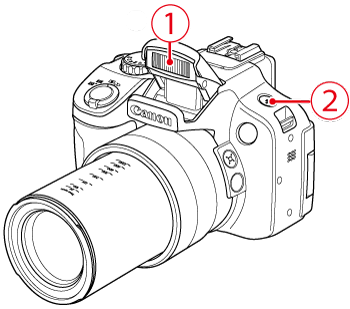
 Lift the flash.
 Press the <Flash> button (
 ).
). 
3. The following screen will appear in the LCD screen.
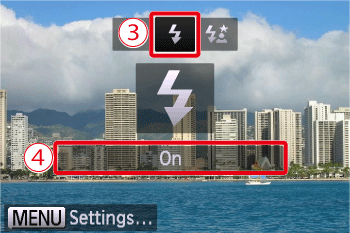
 Operate the <directional buttons> to select the [Flash On] (
 ).
). Make sure to select [On].
4. If the following icon is displayed on the monitor, this completes the setting process.