






Using the Self-timer (EOS M)
Solution
The self-timer is useful when you want to photograph yourself or prevent camera shake caused when the shutter is released.
1. Set the power to <ON>.
2. Press < /
/ > button.
/> button.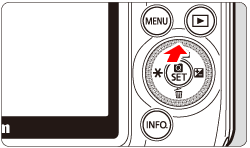
3. Tap the self-timer.
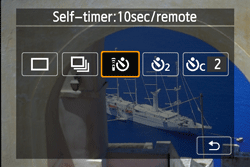
 : 10-sec. self-timer. The remote controller can also be used.
  : 2-sec. self-timer
 : 10-sec. self-timer plus continuous shots. Press <Main Dial> to set the number of multiple shots (2 to 10) to be taken with the self-timer.
4. Focus the subject, then press the shutter button completely.
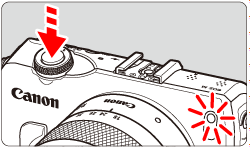
- You can check the self-timer operation with the self-timer/AF-assist beam, beeper, and countdown display (in seconds) on the LCD monitor.
- Two seconds before the picture is taken, the self-timer/AF-assist beam will light up and the beeper will sound faster.
To cancel the self-timer shooting:
Press the </> button or set the power to <OFF>.
/> button or set the power to <OFF>.(To cancel the self-timer setting, press the </> button and tap [  ] or [ ].)
/> button and tap [ ] or [ ].)CAUTION
- With [ ], the interval between the multiple shots may be prolonged depending on the shooting functions settings such as the imagerecording quality or flash.
- When you use a Creative Filter and shoot, even if you set the drive mode
- to [ ] (Self-timer: Continuous), single shooting will take effect.
NOTE
- After taking self-timer shots, playing back the image to check focus and exposure is recommended.
- When using the self-timer to shoot only yourself, use focus lock on an object at about the same distance as where you will stand.