






Paper source type and its paper capacity
Issue
This printer is supplied with two paper sources: the paper cassette (Cassette 1) and multi-purpose tray. By installing the optional paper feeder (Cassette 2), up to 3 paper sources can be used.
Cause and Solution
- Paper Level indicator:
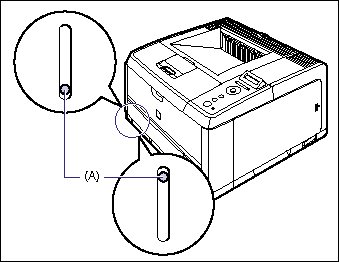
The paper cassette has a paper level indicator (A) that shows the amount of paper remaining in the cassette. If the cassette is full, the paper level indicator is at the top. Because the indicator moves down as the amount of paper drops, this gives a rough estimate of the amount of paper remaining.
Paper source type:
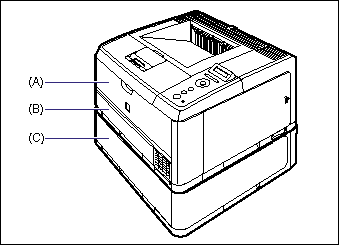
This printer has the following paper sources:
(A): Multi-purpose Tray
(B): Cassette 1
(C): Cassette 2 (Optional)
IMPORTANT
If you are printing from Cassette 2, make sure that Cassette 1 is set before printing. If you print from Cassette 2 when Cassette 1 is not set, this will cause paper jams.
Paper capacity of paper source:
| Paper Type | Paper Source | ||
| Multi-purpose Tray | Cassette 1 | Cassette 2 (Optional) | |
| Plain paper (64 g/m2) | Approx. 100 sheets | Approx. 250 sheets | Approx. 500 sheets |
| Heavy paper (90 g/m2) | Approx. 80 sheets | Approx. 200 sheets | Approx. 400 sheets |
| Heavy paper (128 g/m2) | Approx. 50 sheets | X | X |
| Heavy paper (199 g/m2) | 30 sheets | X | X |
| Transparency | 50 sheets | X | X |
| Label | Approx. 40 sheets | X | X |
| Envelope | 10 sheet | X | X |