




Differences between the AVCHD/MP4 recording standards and how to set them
Solution
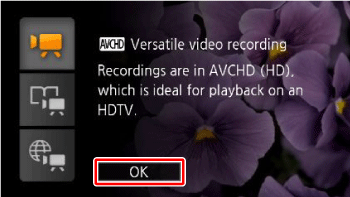
The recording standard determines the type of data the movie is recorded as - namely, AVCHD or MP4.
•AVCHD
Movies are recorded in AVCHD, which is designed for playback on HDTVs. Select this recording standard if you plan to show off your movies and you want to impress your audience with fantastic picture quality.
Also, using the supplied VideoBrowser movie software or a Blu-ray disc recorder, you can create a high-definition disc*1 that can be played back on a player *2.
*1: Blu-ray discs or DVDs (in AVCHD format)
*2: Your computer's disc drive has to support Blu-ray discs or DVD writing.
Movies are recorded in AVCHD, which is designed for playback on HDTVs. Select this recording standard if you plan to show off your movies and you want to impress your audience with fantastic picture quality.
Also, using the supplied VideoBrowser movie software or a Blu-ray disc recorder, you can create a high-definition disc*1 that can be played back on a player *2.
*1: Blu-ray discs or DVDs (in AVCHD format)
*2: Your computer's disc drive has to support Blu-ray discs or DVD writing.
- MP4
By recording movies in MP4, your movies are smaller in size but retain high quality. This is especially useful for playback on portable devices or sharing on the Web.
NOTE
- You can adjust the video quality using the [
 ] > [Recording Mode] setting. For information about recording modes, please see Types of recording modes and changing the recording modes.
 - Some portable devices may not be able to play back MP4 movies recorded with this camcorder.
1. Press <HOME>.
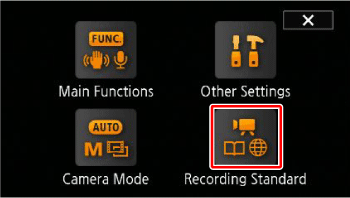
2. Select the recording standard.
2-1. Touch [Recording Standard].
2-2. Touch [  ](AVCHD) or [
  ](MP4).
](AVCHD) or [ ](MP4).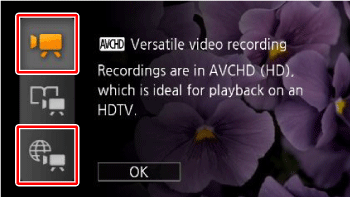
3. Touch [OK].