








How do I display shooting infomation during playback? (EOS 5D Mark III)
Solution
Press the <  >(Playback) button. The last captured image or last image viewed will appear.
>(Playback) button. The last captured image or last image viewed will appear.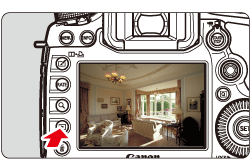
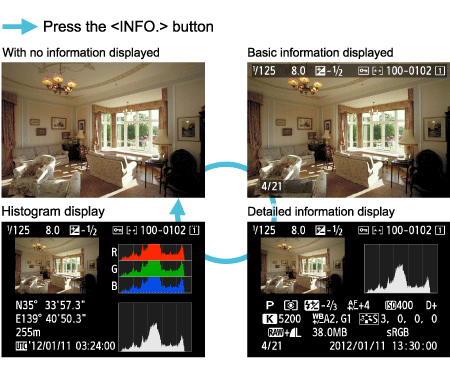
Each time you press the <INFO.> button, the display format will change.
The most detailed shooting information is shown below.
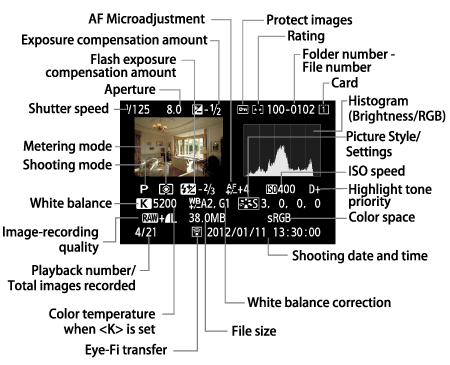
* When you shoot in RAW+JPEG image quality, the RAW image file size will be displayed.
* During flash photography without flash exposure compensation, [  ] will be displayed.
] will be displayed.* [HDR] and the dynamic range adjustment amount will be displayed for images taken in the HDR mode.
* [  ] will be displayed for multiple-exposure photos.
] will be displayed for multiple-exposure photos.* For still photos taken during movie shooting, [  ] will be displayed.
] will be displayed.* If the RAW image has been processed or resized, [  ] will be displayed.
] will be displayed.IMPORTANT
About the Highlight Alert
When [  : Highlight alert] menu is set to [Enable], overexposed highlight areas will blink. To obtain more image detail in the overexposed areas, set the exposure compensation to a negative amount and shoot again.
: Highlight alert] menu is set to [Enable], overexposed highlight areas will blink. To obtain more image detail in the overexposed areas, set the exposure compensation to a negative amount and shoot again.NOTE
About the AF Point Display
When [ : AF point disp.] menu is set to [Enable], the AF point that achieved focus will be displayed in red. If automatic AF point selection was used, multiple AF points may be displayed in red.
: AF point disp.] menu is set to [Enable], the AF point that achieved focus will be displayed in red. If automatic AF point selection was used, multiple AF points may be displayed in red.