






When the built-in memory becomes full, will the recording be automatically saved to the memory card, or vice versa (relay recording)?
Solution
You can activate the relay recording so if the memory you are using becomes full while recording movies, the recording will continue automatically on a memory card.
When recording in the built-in memory, you can choose to use only memory card A for relay recording (  , or use both memory cards (
  ). When recording on memory card A, you can use memory card B for relay recording (
  ).
).
, or use both memory cards ( ). When recording on memory card A, you can use memory card B for relay recording ( ). Confirm the following information regarding the relay recording settings.
1. Insert a memory card that contains no video recordings into the card slot of the memory card you want to use for relay recording.
- When relay recording from the built-in memory: memory card slot
 or both memory card slots.
 - When relay recording from memory card A: memory card slot
 only.
only.
NOTE
You cannot use relay recording from the built-in memory to memory card B. When using a single memory card, be sure to insert it into memory card slot .
.2. Set the mode switch to <M> or <CINEMA>.
3. Turn on the camcorder.
4. Touch [  ].
].
].
5. Touch [ MENU ].
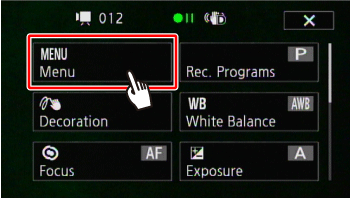
6. Touch [  ].
].
].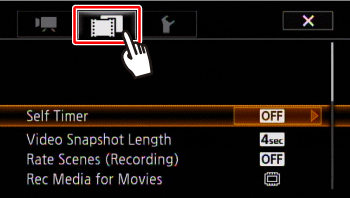
7.  Drag your finger up and down bring [ Rec Media for Movies ] into the orange selection bar,
  and touch inside the frame on the right.
Drag your finger up and down bring [ Rec Media for Movies ] into the orange selection bar, and touch inside the frame on the right.
8. Touch [  ] or [
  ].
].
] or [ ].
9. Touch [Relay Recording].
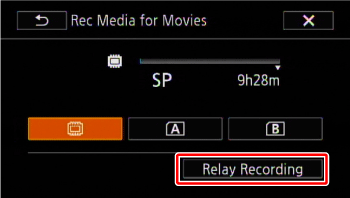
10. Touch [ ] or [ ].
] or [ ].If [ ] was selected in Step 8, then you can only choose [ ].
] was selected in Step 8, then you can only choose [ ].
11. Touch [  ] to close the menu.
] to close the menu.NOTE
- There will be a momentary stop in the scene at the point where the camcorder switches from one memory to another.
- Any of the following actions will deactivate the relay recording function:
- Turning off the camcorder.
- Opening the double memory card slot cover.
- Changing the position of the mode switch.
- Changing the camcorder’s operating mode.
- Changing the memory used for recording movies.