





Selecting Photo Size
Solution
You can select the size of photos by choosing the aspect ratio. You can select [  2016x1512] or [
  1920x1080]. If you select [ 1920x1080], the photo will be recorded in a wide aspect ratio.
2016x1512] or [ 1920x1080]. If you select [ 1920x1080], the photo will be recorded in a wide aspect ratio.1. Turn on the camcorder.
2. Touch [  ].
].
].
3. Selecting Photo Size.
3-1. Touch [MENU] -> [  ].
].
].
3-2. Drag your finger up and down bring [Photo Aspect Ratio] into the orange selection bar, and then touch the orange frame on the right.
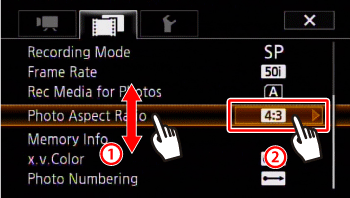
3-3. Touch the desired photo size (aspect ratio).
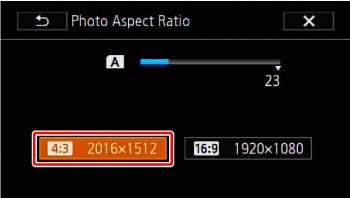
4. Touch [  ] to close the menu.
] to close the menu.NOTE
- The actual number of photos that can be recorded will vary depending on the subject and shooting conditions.
- The camcorder retains the last setting used even if you set the camcorder to <AUTO> mode.