





Cleaning the Inside of the Printer
Solution
If the printed paper has smudge marks, clean the fixing roller using the following procedure.
* A4 plain paper is required to clean the fixing roller. Have A4 plain paper ready.
1. Load A4 plain paper in the multi-purpose tray.
For details on the procedures for loading paper, see "e-Manual" (HTML manual) in the CD-ROM supplied with the printer.
2. Click [  ] in the Windows task tray, and then select the printer name.
] in the Windows task tray, and then select the printer name.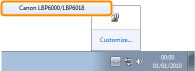
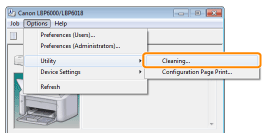
3. From the [Options] menu, select [Utility] → [Cleaning].
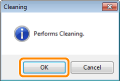
4. Click [OK]. Then, the cleaning page is printed.
→ The paper is fed, and the printer starts cleaning the fixing roller.
NOTE
Cleaning time
- It takes approximately 86 seconds.
* Cleaning the fixing roller cannot be canceled. Please wait until it is completed. (The cleaning is finished when the paper is output completely.)