








Paper Loading Orientation
Solution
To print paper with letterheads or logos, load the paper in the proper orientation as follows.  in the table indicates the feeding directions.
in the table indicates the feeding directions.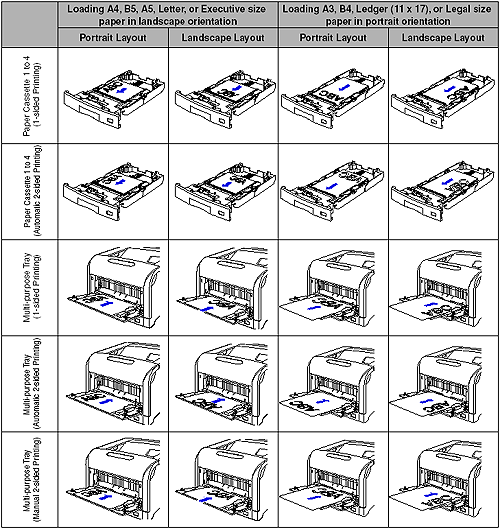
NOTE
- For details on the loading orientation of envelopes, see [Loading Paper in the Multi-purpose Tray].
- If you want to print custom size paper of its long edges 297.0 mm or less when CASSETTE(n) SIZE (n = 2, 3, 4) or TRAY PAPER SIZE in the FEEDER MENU options in the SETUP menu is set to MIXED SIZES, specify the settings according to the printer driver you are using as follows.
- When using the UFR II printer driver: Load the paper in landscape orientation
- When not using the UFR II printer driver: Load the paper in portrait orientation