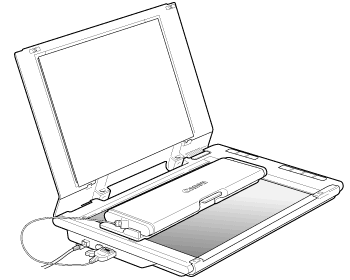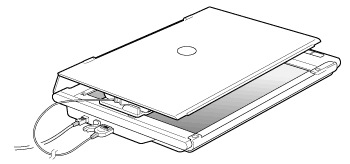





Placing the Film Adapter Unit on the document glass
Solution
This scanner can scan 35 mm film strips (6 frames at a time). Mounted films are not supported.
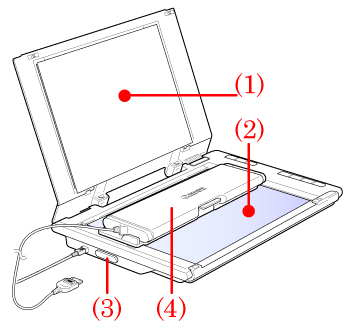
(1) Document Cover: It holds positioned items on the scanner.
(2) Document Glass: Place items to be scanned on it.
(3) FAU connector: Connect the cable of the film adapter unit to it.
(4) Film Adapter Unit: Place it on the scanner to scan films.
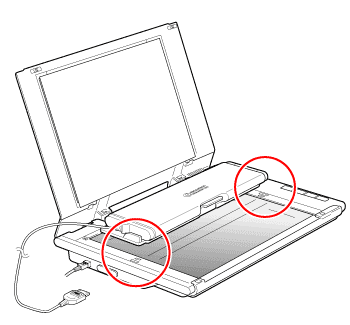
Align the dots on the film adapter unit and the dots on the scanner to set the unit in place.
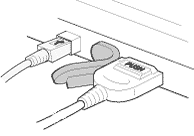
Open the rubber cap of FAU adapter on the side panel of the scanner, then plug in the cable connector of Film Adapter Unit facing its PUSH button side up, holding the both sides of the connector with your fingers.

Place the film face up (correctly viewed from above) in the film guide.
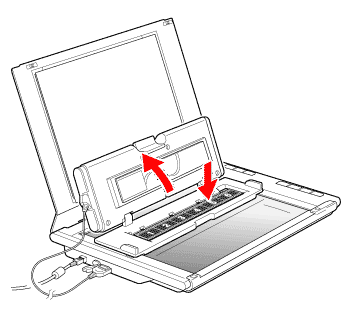

Close the film adapter unit until it clicks then gently close the document cover.
* When scanning films, the document cover does not touch the document glass. Be careful not to force the document cover down.